How Do You Turn Month-by-Month Baby Photos Into an Evolution Video?
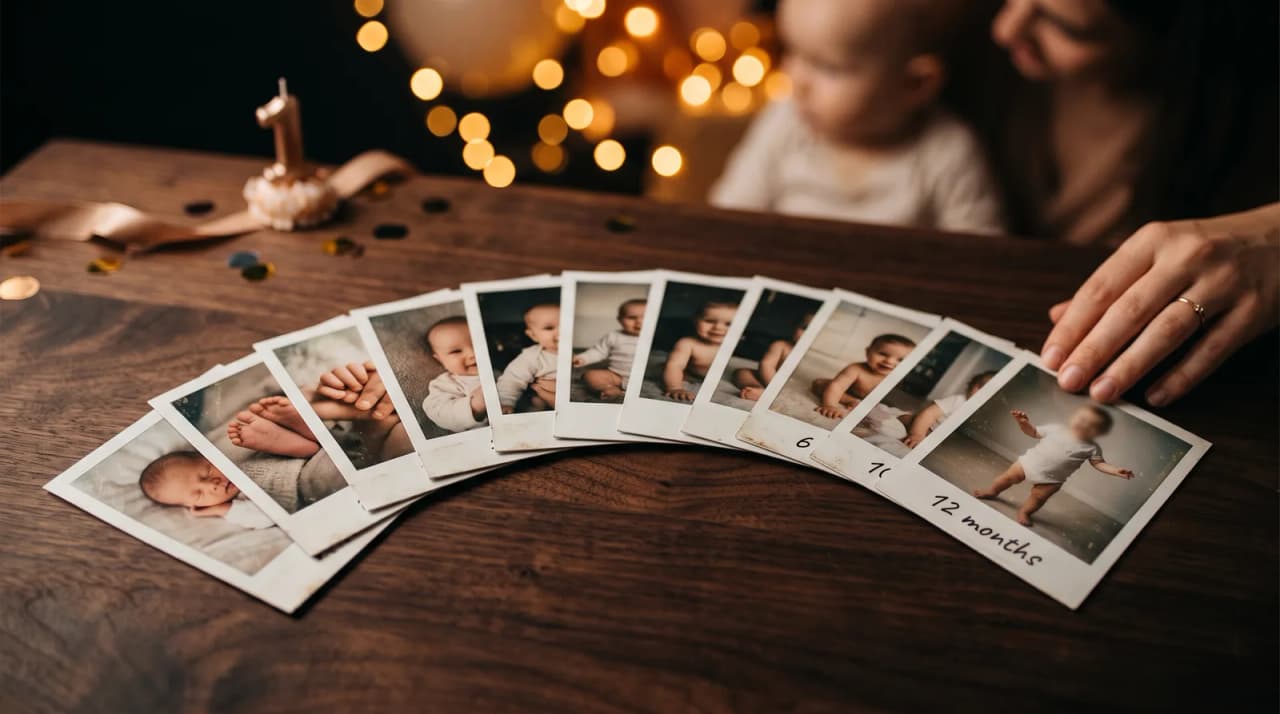
Quick answer
You can turn your baby's monthly milestones into a cinematic evolution video by uploading your clearest monthly photos to a tool like LifeStory AI.
By LifeStory AI Editorial · ·
In this guide (9 sections)
The platform instantly generates a professional, emotional time-lapse that you can download and share at their first birthday party.
You blinked, and your newborn is suddenly turning one. Your phone holds thousands of photos, but scrolling a camera roll does not capture the emotional weight of that first year. Relatives who missed the ordinary Tuesdays deserve to see the growth, not guess at it from a few snapshots in a group chat.
What tends to work for a first-birthday evolution video?
Our recommendation: pick one clear photo per month using the same angle and lighting when you can, keep the strongest months the studio allows, then let a short evolution film do the emotional work at the party. A live camera-roll scroll loses the room; a short growth arc gives everyone the same gasp at the same moment.
Sources: CDC developmental milestones (opens in new tab).
Many parents already start a digital photo timeline on day one. The birthday video is where that discipline pays off - or where you reconstruct twelve anchors from the chaos if life got in the way.
Imagine this: the first-birthday reveal
Imagine the cake is lit, grandparents are seated, and the TV fades from month one on a hospital blanket to month twelve standing at the high chair. Nobody narrates. The room just watches a face grow up in under a minute. That is the difference between "we took a lot of photos" and "we can show you the year."
What is the Twelve-Month Growth Ladder?
The Twelve-Month Growth Ladder is a simple way to choose photos for a first-year evolution video. You need one strong anchor per rung - not every cute moment, just the clearest proof of change:
| Rung | Age | What to look for |
|---|---|---|
| Arrival | Birth week | Face clear, natural light, minimal props |
| Early change | Months 1-3 | Same spot or angle as birth if possible |
| Sitting era | Months 4-6 | Torso visible, expression toward camera |
| Mobile | Months 7-9 | Crawling or pulling up - limbs in frame |
| Standing | Months 10-12 | Upright or near-walking, recent candid |
| Birthday close | Party week | "This is them now" - one frame to hold |
You do not need thirteen identical studio shots. Consistency helps transitions; expression matters more than perfection. If you are unsure how many images the tool needs, see how many photos make smooth AI transitions.
Storyboard sketch: about twenty-five seconds, six beats
Use this when briefing whoever runs the screen at the party:
[0:00] Birth or week-one portrait - the opening frame
[0:05] Morph to month 2 or 3 - let growth feel fast
[0:10] Sitting months - a clear, steady face
[0:15] Crawling or pulling up - the "they move now" beat
[0:20] Standing or walking attempt - recent energy
[0:25] Final frame at the cake - then applause or song cue
Twelve-Month Growth Ladder at a glance
Newborn
   ↓
Sitting
   ↓
Standing
   ↓
First steps
   ↓
Birthday one
How does LifeStory AI fit a first-birthday video?
LifeStory AI aligns faces and builds cinematic transitions between your monthly anchors so you are not learning editing software during nap time. Upload a chronological set - at least three, up to the studio's maximum, so pick your strongest months - and the platform produces a watchable evolution sequence in minutes. Privacy matters for children's photos: uploads are stored encrypted, used only to create your video, and deleted on request.
For party playback tips - looping on a TV, keeping audio off during cake time - see creative deployment of evolution videos at events. For lighting habits that keep month-to-month skin tone honest, review best lighting for digitizing and shooting memory photos.
Which photos work best for a baby evolution video?
| Photo element | What to do | What to avoid |
|---|---|---|
| Lighting | Natural daylight facing the baby | Dark rooms or harsh colored bulbs |
| Framing | Face centered and clearly visible | Extreme close-ups or hidden faces |
| Background | Simple, uncluttered | Busy patterns that distract from growth |
| Expression | Eyes toward camera when possible | Profile-only shots for every month |
| Consistency | Same blanket or chair when you can | A new backdrop every session |
How can you share the video with family?
Cast it to the party TV for the centered reveal, then send the downloadable file to relatives who could not attend. A private family chat beats a public post when the archive includes home interiors and everyday moments. If guests want to save a copy, pair the screen moment with a QR code as described in sharing milestone videos on social media - even when the audience is mostly family.
Cross-method note: The Day-One Capture Protocol feeds the Twelve-Month Growth Ladder — same angle discipline, different payoff date.
What have we noticed?
We've noticed first-birthday videos that skip the newborn rung feel like they start mid-story — always include one clear early-month face even if the print is imperfect.
Our editorial take
We think monthly photo bursts from the same nursery angle are almost always too many; one anchor per growth phase beats twelve similar frames.
A surprisingly specific detail
Capture the birthday-morning photo before guests arrive — messy hair and pajamas often read more honestly than the party outfit an hour later.
What mistakes do we see over and over?
- Using ten photos from the same week - the ladder never climbs.
- Changing angle every month - growth becomes harder to see on screen.
- Waiting until the party week to gather files - you end up with gaps and panic.
- Opening with a blurry hospital phone shot - pick the clearest arrival frame you have.
- Running a long uncut camera-roll montage - two minutes usually beats ten for mixed ages.
- Skipping a playback test on the actual TV - sleep settings and aspect ratio still surprise people.
What should you do before the birthday party?
Use this checklist the week of the event:
- Select one anchor photo per month using the Twelve-Month Growth Ladder
- Put images in chronological order and remove near-duplicates
- Generate the evolution video with LifeStory AI and download a backup copy
- Confirm who cues the screen and when (before cake or after)
- Test video on the party TV or projector
- Share the file privately with grandparents who cannot attend
Frequently asked questions
How many photos do I need for a first-year evolution video?
Twelve to fifteen well-chosen monthly anchors are usually enough. One strong image per month beats a large dump of similar naps and smiles.
What if I did not take monthly photos on a schedule?
Rebuild the ladder from your camera roll: pick the clearest frame that best represents each age band. Starting a day-one timeline system now still helps for year two.
Should the video have music at the party?
Often yes for a featured play, but test volume against the room. Many parents use a featured screening with sound, then a silent loop during gifts if the TV stays on.
Is it safe to upload photos of my baby?
Choose a tool with clear privacy defaults. LifeStory AI stores uploads encrypted, uses them only to create your video, and deletes them on request - important when the set is intimate and ongoing.
The first year moves whether you film it or not. The video's job is to make that speed visible to everyone who loves them.
More in this topic
How to Make a Cinematic Quinceañera Photo Transition Video
Select childhood milestone photos and turn them into a cinematic Quinceañera evolution video in minutes.
How to Create a Smooth Child Evolution Video for a Sweet 16 Birthday
You can create a smooth, emotional child evolution video for a Sweet 16 by gathering a chronological set of photos and processing them through an…
How Do I Make an Evolution Video for a Parent's 60th Birthday?
Gather a handful of clear photos from childhood to today and turn them into a cinematic 60th birthday evolution video in minutes.